• Home
  • About
  • Training
  • Events
  • Solutions
  • Contact Us

AWS Support Resources

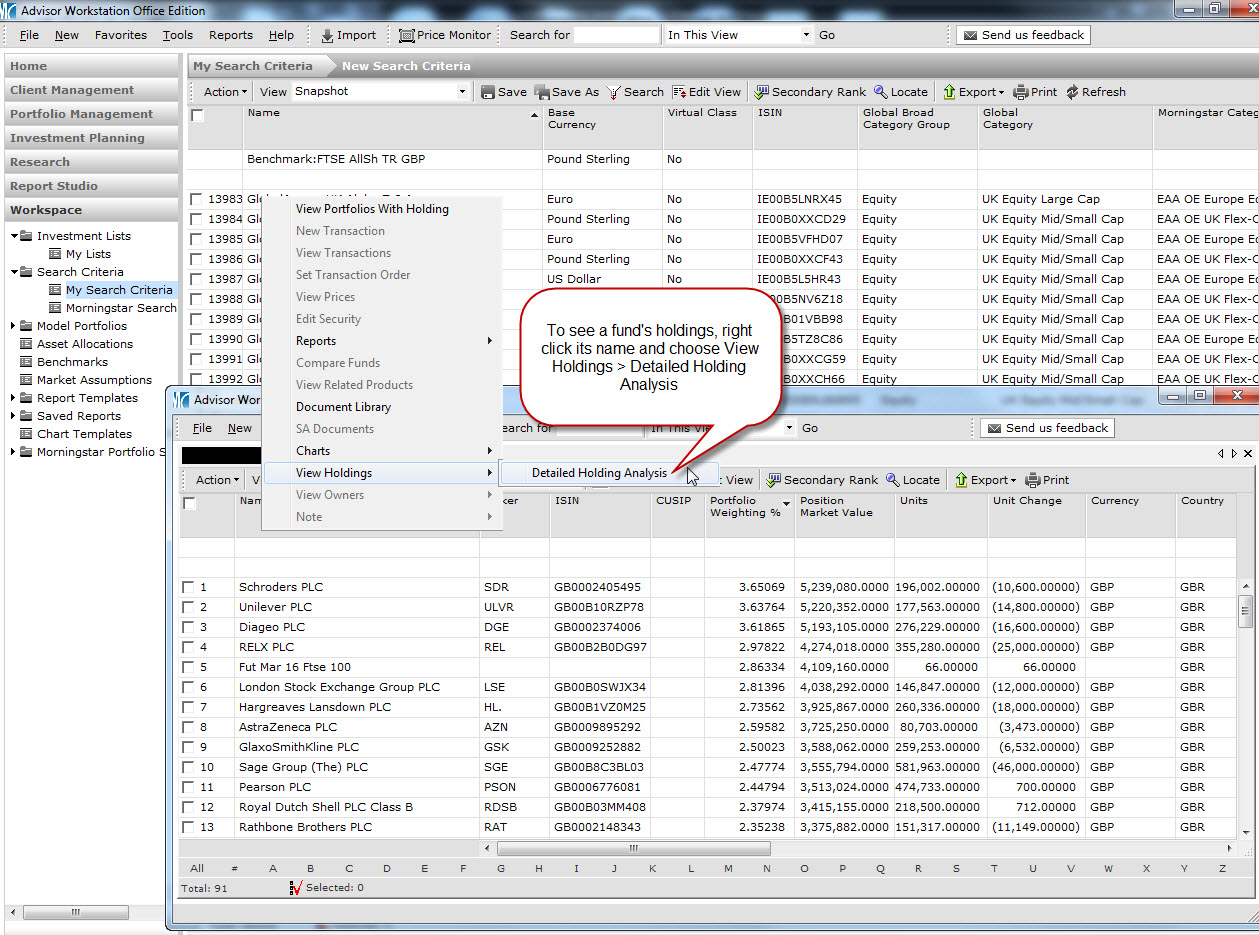
See exactly what a fund is investing in

by Alexander Wells on 01 Feb 2016

Morningstar Adviser Workstation contains the full holdings data for thousands of funds, so if you’d like to know what equities a fund has, if it has any short positions, or exactly where that 10% allocation to property comes from, click the image below to see how you can view this information:Click to see how to view underlying holdings
 

Posted in: Quick Tips,

  • Recent Articles

    • Portfolio Diversification – the Correlation Matrix
    • Portfolio Types
    • What does my portfolio cost?
    • Importing data to Adviser Workstation
    • Ethical Investing – How Morningstar can help
    • Aggregates (Or ‘How to combine multiple portfolios into one’)
    • Portfolio Performance Reports
    • Adding currencies, security reclassification & pricing – The Definition Master
    • Providing investors visibility via the web portal
    • Planning for Retirement – how Adviser Workstation can help
    • Create truly custom reports
    • New Updated Risk Questionnaire
    • Where am I invested?
    • Chart your data
    • Latest training update – Importing from Excel

Home | About | Training | Events | Solutions | Guest Contributors
Disclaimer | Privacy Policy | Corporate Site | Sitemap
© Morningstar. All Rights Reserved.