Fund Fees in Adviser Workstation
It can be quick and simple to view fund fees in Adviser Workstation, so here are a few tips to help navigate your way to this data.
Total Expense Ratio (TER) is one of the most commonly used methods of comparing fees for open end funds, though with the introduction of the Key Investor Information Document (KIID), it is likely Morningstar will list a KIID Ongoing Charge figure instead.
If you are in the Client Management or Portfolio Management tab, open a portfolio and simply scroll all the way to the right to view the KIID Ongoing Charge data point. The Summary line will list the weighted average ongoing charge figure.
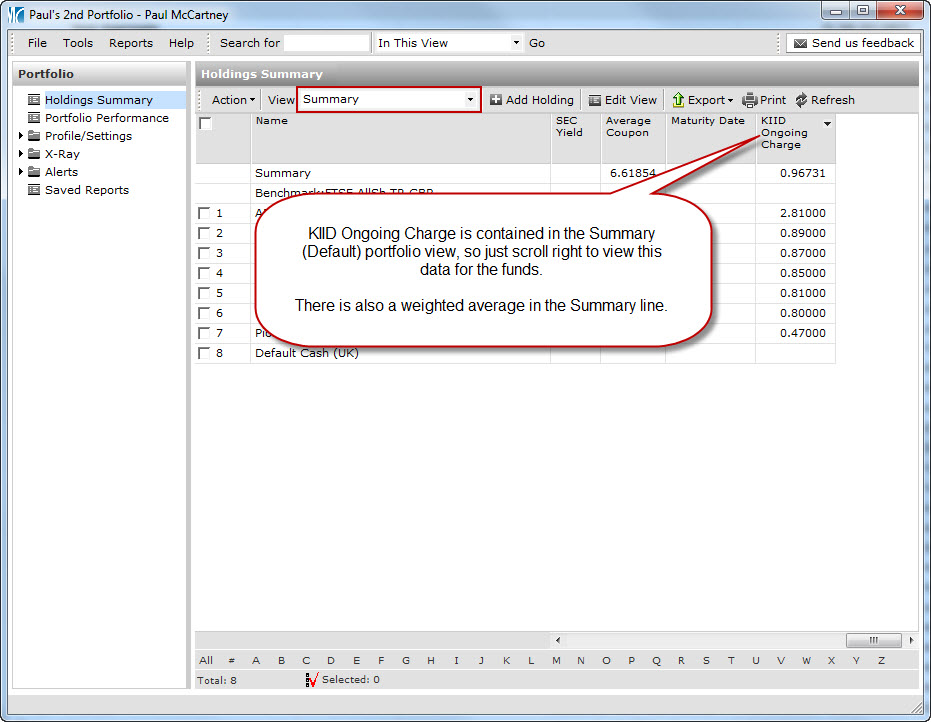
In a list or search in the Workspace tab, click here to see where the KIID Ongoing Charge column is listed.
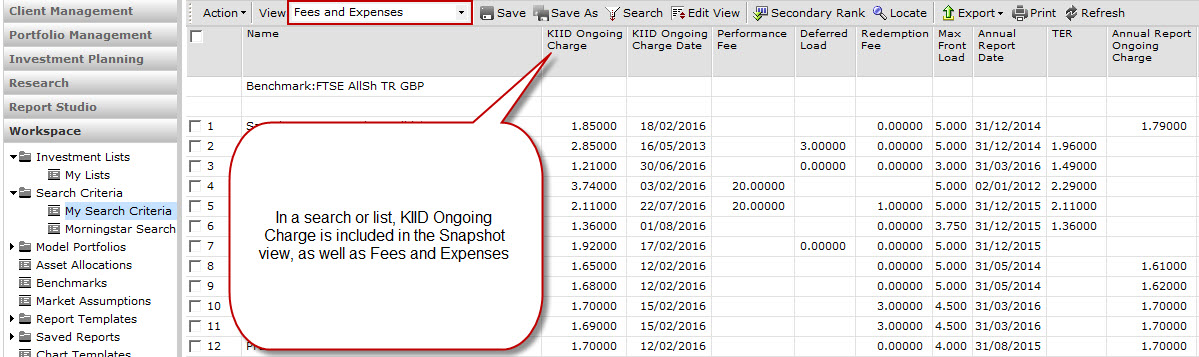
If you are viewing Life & Pensions funds, TER will most likely still be used. For Exchange-traded funds use Prospectus Net Expense Ratio, and for Closed End Funds it is Annual Report Ongoing Charge where we have the most data.
For reference, Morningstar Adviser Workstation displays the return for all funds including their fees, as per following:
Unless marked as load-adjusted total returns, Morningstar does not adjust total return for sales charges or for redemption fees. Total returns do account for management, administrative, and 12b-1 fees and other costs automatically deducted from fund assets.